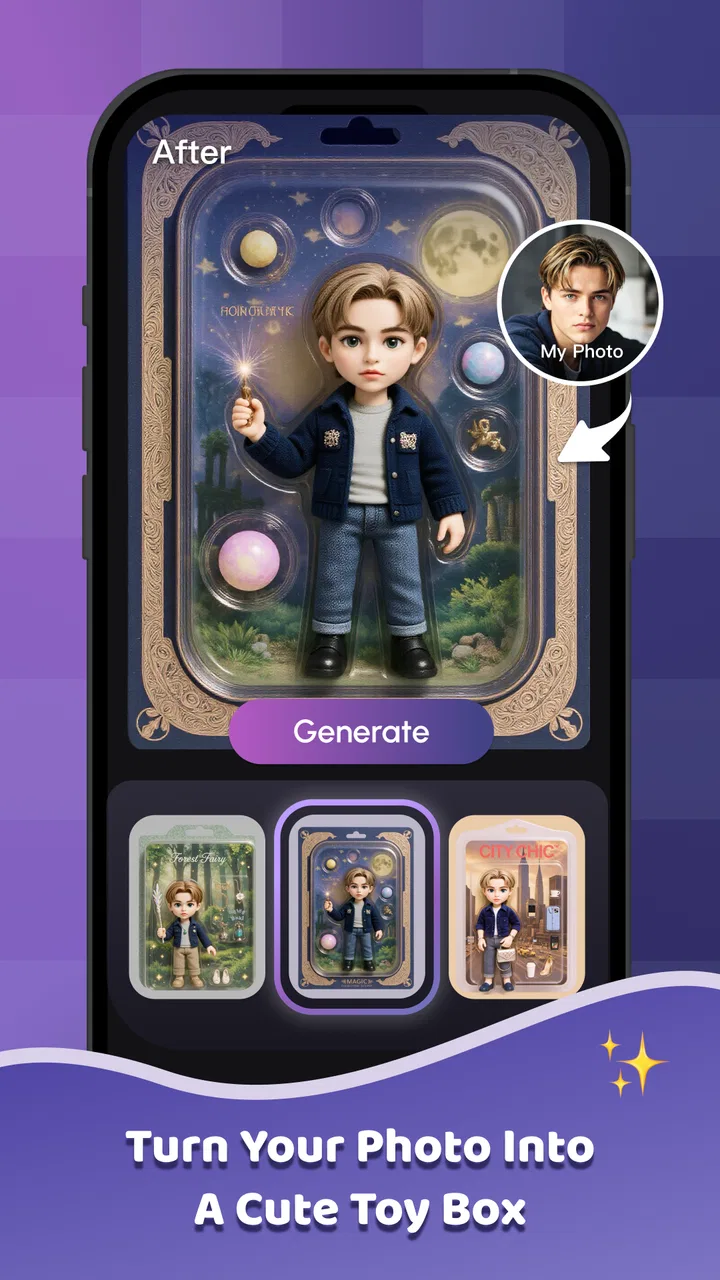
Ai Vista
- 3.1
- Rating
- 10.00K
- Installs
- Free
- Price

 Analysis by App-foxy
Ai Vista is the kind of photo app I open when I want an image to feel more finished without spending a long time learning a full editing suite. Its focus is AI-assisted photo work, so the appeal is speed: choose an image, try a transformation or enhancement, and judge the result quickly. I found that approach more useful for casual visual projects than for careful professional retouching.
Developed by SCIENJOY META TECHNOLOGY L.L.C, the app sits in the Art & Design category and is free to install. It is available for Everyone and runs on Android devices using version 6.0 or later. The current release is 1.5.2, and the app has passed the early trial stage with more than ten thousand installs. That gives it a modest but meaningful user base, while the average rating of 3.1 from roughly sixty ratings suggests that the experience is appealing to some people but not consistently smooth for everyone.
I would describe it as a quick creative companion rather than a replacement for a serious editor. If you want to experiment with a portrait, prepare a social post, or give an ordinary snapshot a more imaginative look, it has a clear purpose. If you need exact color control, reliable layer editing, or a carefully repeatable professional workflow, a conventional editor will usually be the safer choice.
You May Also Like

 Pandora - Music & Podcasts
Pandora’s Music Is Easy to Start, but Harder to Recover
Pandora’s strength is its low-effort path from a seed to a station. Its weak spot is how much confidence it asks you to place in connection, setup, and quiet recovery.

 AccuWeather: Weather Radar
AccuWeather Review: A Quick, Clear Forecast for Everyday Decisions
For everyday plans, the best forecast is the one you can understand quickly. AccuWeather makes rain timing, radar, and local conditions easy to act on, with a few trade-offs.

 Hill Climb Racing
Why Hill Climb Racing Still Turns Crashes Into One More Run
A tiny car, a bumpy hill and one more upgrade: Hill Climb Racing keeps resurfacing because its simple chaos makes every near-miss feel personal.

 AliExpress - Shopping App
AliExpress Makes Global Shopping Feel Personal, but Shoppers Bear the Risk
AliExpress turns a global marketplace into a pocket-sized discovery engine. Its reach is useful, its shopping loop compelling, and its trade-offs easy to miss.

 Lords Mobile: Kingdom Wars
Lords Mobile Is a Kingdom-Building Routine, Not a Quick Match
A case-by-case verdict on the building, battles, device demands, and social commitments that make Lords Mobile rewarding for some players and exhausting for others.

 PDF Scanner app - TapScanner
TapScanner Makes Paperwork Easier to Capture, Check, and Share
TapScanner makes scanning with a phone feel less like a rescue operation and more like a dependable step in getting work done. Its capture tools are useful, though not flawless.
More From Our News Desk
View All News


Starting with a simple photo workflow
My recommended starting point is deliberately basic. I choose one image with a clear subject, apply one visual idea at a time, and inspect the result before trying another variation. This sounds obvious, but it matters with AI photo tools because a busy image can make it difficult to tell whether the app improved the composition or simply changed too much at once.
For a first session, a well-lit portrait or a clean object photo is a better test than a dark group picture. A simple source image makes it easier to notice how the app handles faces, edges, background details, and the overall mood. I also keep the original untouched and treat each generated result as a separate experiment. That habit prevents a disappointing effect from becoming the only version of a photo I have.
The most practical everyday scenario is preparing a quick image for a message or social post. Imagine taking a slightly flat photo of a coffee, a handmade item, or a travel view. I would open it in Ai Vista, try a restrained visual treatment first, and compare the output with the original before deciding whether the stronger effect is actually better. The goal is not to make every image dramatic; it is to make the chosen image communicate more clearly.
That comparison step is where the app becomes more useful than a one-tap novelty. I look for three things: whether the main subject remains recognizable, whether important edges still look natural, and whether the background has become distracting. AI effects can make a picture feel impressive at first glance while introducing small distortions that become obvious when the image is enlarged. Checking those details before sharing saves time later.
I also recommend testing several different kinds of source material instead of judging the app from one photo. A portrait reveals how it treats facial features. A landscape shows whether it preserves depth and texture. An object photo exposes problems around straight lines and small details. This small test set gives a more honest impression than repeatedly applying effects to the same favorite picture.
Choosing the right starting image
Experienced use begins before the app is opened. I select images that already have a clear focal point, because an AI treatment cannot fully rescue a confusing composition. A subject placed against a simple background gives the visual transformation room to work. When the frame contains many overlapping objects, I use lighter changes and avoid judging the result only by its novelty.
Resolution and framing also affect the decision. A tightly cropped face may work well for a portrait-style experiment, while a distant person in a wide scene may lose important detail. I do not assume that a more intense treatment is automatically more suitable for a larger image. Sometimes a subtle result looks better because it preserves the context that made the original photograph worth keeping.
One useful habit is to make a small copy of the source before experimenting. I can then try a bold direction without worrying about losing the original arrangement. I also rename or separate results by purpose, such as profile image, invitation draft, or personal experiment. That simple organization becomes valuable when several variations begin to look similar.
Settings and choices worth checking
Rather than rushing through the first available effect, I spend a moment checking the controls presented for the selected workflow. The exact choices can vary with the image and the app version, so I pay attention to what is visible on screen instead of assuming every tool behaves the same way. I look for options that influence intensity, style, or the way the final image is prepared, then change only one setting at a time.
This one-change rule is especially helpful when a result looks wrong. If I alter several controls together, I cannot tell which decision caused the problem. By testing one adjustment, reviewing the preview, and then deciding whether to keep it, I build a repeatable understanding of what works for my own photos. It is slower during the first few attempts but faster after that.
I also check the final preview at normal viewing size, not only while zoomed in. Zooming helps reveal rough edges and strange details, but an effect that looks attractive close up may overpower the image when viewed as a whole. Conversely, a small improvement may seem unimportant in the preview and become exactly what the photo needed when shared at a smaller size.
Because the app includes in-app purchases ranging from forty-nine cents to $144.99 per item, I would pay attention to any purchase prompt before confirming a premium action. The free entry point makes it easy to explore, but the presence of a wide purchase range means I would not tap through a payment screen casually. I prefer to decide first whether the particular result is worth keeping, then consider whether paying for that action fits my use.
That is also why I would not build an entire project around an effect before checking the available path to the final image. For a personal experiment, a quick preview may be enough. For a design I need to deliver, I want to know that the result can be saved or used in the way I expect before investing time in repeated variations. This is a practical safeguard, not a criticism of AI editing itself.
Repeatable patterns that make the app faster
The fastest way to use Ai Vista is to create a small personal routine. I begin with a clean source, test a moderate treatment, inspect the subject, and only then try a more expressive version. After a few sessions, I know which kinds of photos deserve a subtle approach and which can handle a stronger visual change. That familiarity reduces random tapping and makes the app feel more purposeful.
I keep separate routines for portraits, objects, and scenery. Portraits need careful attention to facial identity and skin texture. Product-like objects benefit from checking straight edges and readable markings. Scenery can tolerate more atmosphere, but I still watch for unnatural transitions in skies, foliage, or distant structures. Using the same evaluation questions for each category helps me compare results fairly.
Another efficient pattern is to decide the destination before editing. A picture intended for a small profile image does not need the same treatment as one meant for a printed design or a large display. For a small destination, I prioritize a clear silhouette and strong overall mood. For a larger destination, I inspect fine details more carefully and reject results that look attractive only when viewed from a distance.
I also avoid generating a long sequence of nearly identical versions. After two or three meaningful variations, I compare them side by side and choose the one that communicates the intended feeling most clearly. If none works, I return to the original and change the source or direction instead of endlessly increasing intensity. This keeps the creative process from turning into a collection of minor edits with no clear winner.
For a recurring task, such as preparing a weekly image for a small project, I would keep the same framing and evaluation order. Consistency makes it easier to see whether the visual treatment is helping the content or merely making each image look different. Ai Vista is most useful in that setting when it supports a recognizable style rather than replacing one with a new effect every time.
Where the AI approach reaches its limits
The main limitation is control. AI-assisted results can be quick and visually interesting, but they do not always behave like precise manual adjustments. When I need one specific object changed while everything else stays untouched, a traditional editor with selection tools, layers, and masks gives me more confidence. Ai Vista is better suited to broad transformations and creative exploration than to surgical corrections.
Small details deserve particular caution. Text inside an image, jewelry, fingers, hair strands, repeating patterns, and sharp architectural lines can reveal weaknesses that are easy to miss in a thumbnail. I zoom in after every important generation, especially when the image will represent a person, product, or event. If the result changes a meaningful detail, I prefer the original or a manually edited alternative.
There is also a trade-off between speed and predictability. A conventional editor asks me to make more decisions, but those decisions are usually visible and repeatable. Ai Vista can reach an appealing direction quickly, yet the same input may require several attempts before the result feels right. For a one-off creative post, that trade can be worthwhile. For a batch of images that must match closely, it can become frustrating.
I would skip this app if my priority were professional color grading, detailed typography, non-destructive layer work, or exact brand consistency. I would also be cautious if I dislike experimenting or if I need every result to preserve the source image with minimal alteration. In those situations, a familiar manual editor is the better tool, even if it takes longer.
On the other hand, people who find conventional editing menus intimidating may appreciate the shorter path from photo to visual idea. The app’s free installation makes it reasonable to test without committing immediately. Still, I would judge it by the quality and usefulness of the results I can actually keep, not by how quickly it produces something surprising.
Who will get the most from Ai Vista
I see the strongest fit for casual creators, social media users, students working on visual assignments, and anyone who wants to explore an image without mastering a large editing program. It can also help someone who has a good photo but wants to test several moods before choosing a direction. The experience is more approachable when the user is comfortable treating each result as a draft rather than expecting flawless automation.
It is less suitable for a photographer who needs a dependable finishing pipeline, a designer who must preserve exact elements, or a business that cannot risk visual inconsistencies. The app may be useful during the idea stage for those users, but I would move the final work into a tool with stronger manual control. That combination makes more sense than asking one app to handle both inspiration and precision.
Age accessibility is another positive point: the content rating is Everyone. Even so, I would still guide younger users through purchase prompts and through the habit of keeping original photos separate from generated versions. An accessible rating does not remove the need for sensible file organization and careful decisions when images include other people.
Performance expectations should remain realistic. The app has a 3.1 average from about sixty ratings, which tells me to approach it with curiosity rather than assuming a universally polished experience. A user with a newer, capable device may find the workflow comfortable, while someone on older hardware should be prepared for a less effortless session. I would install it for a specific creative test, not as my only photo editor.
My verdict after building a practical routine
After using Ai Vista as a focused AI photo experiment, I think its value comes from reducing the distance between an ordinary image and a creative draft. I like the idea of starting with a clean photo, trying a controlled treatment, checking the details, and keeping only the versions that serve a clear purpose. That workflow is simple enough for everyday use and disciplined enough to avoid random effect hunting.
The app is not a universal answer for photo editing. Its strongest moments are quick transformations, visual brainstorming, and situations where a little experimentation is more important than exact control. Its weaker moments appear when details must remain untouched, when several images need to match precisely, or when a result requires careful manual correction.
My practical recommendation is to treat Ai Vista as a fast idea generator, not as a complete studio. Install it if you enjoy testing different looks and want a low-commitment way to explore AI-assisted design. Keep a manual editor available for final cleanup, and be deliberate around the in-app purchase range before approving anything. With that expectation, the app can earn a place in a creative routine; without it, the lack of predictable fine control may quickly outweigh the convenience.
In the end, I would recommend it to a friend who wants to make photos more expressive with minimal setup, especially when the image is personal and experimentation is part of the fun. I would not recommend relying on it alone for demanding client work or exact visual production. Its best use is focused, repeatable, and modest: choose a strong source, make a few purposeful attempts, inspect what changed, and keep the version that improves the picture rather than merely making it different.
FAQs for Ai Vista
01What is Ai Vista and what can I use it for?
Ai Vista is an AI-focused application designed to help users create, enhance, or interact with digital content through intelligent tools. Depending on the version available for your device, it may support features such as image generation, visual editing, creative assistance, or AI-powered analysis. Before downloading, check the current store description because available functions can differ between Android and iOS releases.
02Is Ai Vista free to download and use?
Ai Vista may be available as a free download, but some tools or advanced features could require in-app purchases, a subscription, credits, or a premium upgrade. During testing, users should pay attention to trial terms, renewal dates, and payment prompts rather than assuming every feature is free. Always review the app-store pricing and subscription information before confirming a purchase.
03Does Ai Vista require an internet connection?
Most AI applications depend on cloud-based processing, so Ai Vista will generally need a stable internet connection for its main functions. Uploading images, generating results, or processing requests may be slower on mobile data or unreliable networks. Some basic interface elements may work offline, but users should not expect the complete AI experience without being connected to the internet.
04Is Ai Vista safe to use with personal photos and information?
Users should review Ai Vista’s privacy policy before uploading personal photos, documents, or other sensitive material. AI services may send content to remote servers for processing, and the way that content is stored or deleted can vary. Avoid uploading confidential images or identifying information unless you understand the app’s data practices, permissions, retention policies, and third-party sharing terms.
05Which devices are compatible with Ai Vista, and is it easy for beginners?
Ai Vista’s compatibility depends on the operating-system version and the specific release offered through Google Play or the Apple App Store. A reasonably modern smartphone should provide the best performance, especially when using image or AI-processing tools. The interface is generally intended for everyday users, although beginners may need a little time to understand prompts, credits, editing controls, and export options.
Pros
- Generates polished AI visuals quickly from simple text prompts.
- Offers creative inspiration for social posts
- wallpapers
- and projects.
- Easy interface makes image creation accessible to beginners.
- Useful for exploring multiple visual styles without design experience.
- Can speed up early concept development and brainstorming.
Cons
- Results may differ noticeably from the details described in prompts.
- Some advanced tools or generations may require in-app purchases.
- AI images can include distorted hands
- text
- or small background details.
- Privacy terms should be checked before uploading personal photos.
- Frequent generation may require a stable internet connection.

Ai Vista
Gallery